About the
BandTrax site.
You can
now receive your files 24 hours a day, 7 days a week. All
financial transactions are handled by the NEW National Secure
Internet Payment Service (NSIPS). This is a division of the
National Australia Bank. All transactions are strictly between you
and the National Australia Bank. No one, apart from yourself, sees
your credit card details ... not even us. The site is hosted on
high speed secure servers, providing you with fast, efficient
access throughout the site. You simply search for what you need
then the "buy" button for the MIDIfiles you want. Then "view
the cart", provide your details and that's it. Now check your
Email for your order. You can also play or download the demos
before you order.
You get;
* Quality #1 MIDIfiles on-line 24/7. Just Midifiles for Midiphiles.
* Direct Download. No waiting. Sent to you as you order. Use the
songs NOW!
* Order in GM or GS. The choice is yours. Optimised for your
equipment. Selectable in the Cart.
* Order in Format 1 or Format 0. The choice is yours. No
converting. Selectable in the Cart.
* View the latest releases in real-time. Get the latest releases
first. NOW!
* View the Top 30 selling MIDIfiles in real-time. See what's
popular NOW!
* No clubs, no points, no scams. The more you
order the more you save. Simple.
* Real-time currency exchange. Try it in the Price List
* Downloadable Demos of all MIDIfiles. Right the Demo and
save. Try them where you use them.
* Uncompromising Customer Service. If we know about it, we'll
endeavour to help you out.
* Comprehensive FAQ pages. Find the answers to your questions.
* Free promotion & advertising. Check out the Elite Users. If
you're not there you should be.
Back to Top
I can't find what I want when I
search.
To use the BandTrax site you must have JavaScript, Cookies
and Pop-Ups enabled.
The site uses JavaScript to validate user input and cookies to
identify you as a user while searching or using the shopping cart.
Cookies are returned only to the Web server from which they were
issued and all session cookies expire automatically when you quit your
browser. Pop-Ups are used for various
help and graphic displays.
Failure to have the correct settings
on your browser will result in blank pages, empty blue screens and failure when
using the shopping cart. Test your browser
here.
Once your browser is
correctly configured it is recommended when entering search criteria that partial
words be used. Why? You get a more comprehensive result. Use artist surnames or
partials, and key words or partials for song titles. If you’re not sure of the
spelling don’t worry … use parts of the words you are sure of. As an example we
could use pres for searching titles by Elvis. We could use Elv, or vis, or even
Elvis. We could have also used sley, or ley, or presley. Believe it or not we
have seen searches on Alvis and Presly. This is where the partial search is
beneficial. And if you already know the catalogue number of the MIDIfile you
need, you can enter that also.
Back to Top
Why do the demos sound great thru my MIDI player or keyboard but sound awful
thru my computer sound card?
We recommend that you use a Sound Module or external sound generator rather than
the computer sound card for our MIDIfiles. Sure, there are some quite good sound
cards these days, but MOST are cheap cards thrown in on a package computer deal.
These cards have a very basic GM sound set and a rather average dynamic range.
Remember that these cards are primarily designed for games, NOT for full midi
arrangements. When checking our demos, it may be worthwhile "right ing" on
the demo and saving it for further listening on a higher quality MIDI sound
device.
Back to Top
Why do you show things like "Single Mix" or
"Album Version" etc. in the catalogue listings?
We have learnt the hard way that an artist may release different versions of the
same song through out the world. For example, an artist may release the
single version in Australia with a solo, yet not include the solo in the U.K. or
USA release. There are also variations in what is actually the single or album
version. Some territories may use the album version for single airplay, while
others use a separate mix single airplay version. There are now also differences
between some AM versions and FM versions of the same song. Here are just some
examples:
You Sexy Thing by Hot Chocolate - The U.K.
version has a 16 bar intro NOT on the Australian release.
Key Largo by Bertie Higgins - The USA version has
an extra verse & chorus NOT on the Australian release.
Play That Funky Music by Wild Cherry - Some
releases include the key change before the end of the recording.
Midnight At The Oasis by Maria Muldaur - The
guitar solo is different in the U.K. release than that on the Australian
release.
If Tomorrow Never Comes by Ronan Keating - There
are two single releases. One is CD1 and the other ... CD2. Both have the single
release that is slow. There is also a different up tempo version included on
both single releases, however the slow version is the considered single version.
Shania Twain - The album Come On Over was
released twice, about 12 months apart. The original release was more a "band"
version, where as the tracks on the second release were more "electronic" with
dance mixes included. The song listing on both albums is the same. Many of the
single versions from both album releases are different from those on the albums.
Sex Bomb by Tom Jones - There are three distinct
version releases. The U.K. single version is a down mix of the album version.
The album version is same as the Australian single version. There is also the
"Peppermint Disco Radio Mix" included with the single release in Australia and
some other territories.
Underneath The Radar by Underworld - The single
release is much shorter than the album version, however the album version is
considered the normal version as it is this version that is used in clubs.
I Say A Little Prayer by Diana King - The single
and album versions are completely different in arrangement, tempo and feel.
Most People I Know Think That I'm Crazy by Billy
Thorpe - There is a single version that does not include the solo (or part of
it). The album version is considered the normal version.
On A Night Like This by Kylie Minogue - The album
version is the Australian single version. The video version in the U.K. is a
different arrangement with more drums/percussion included in the mix.
Young Hearts Run Free by Kim Mazelle - The album
version is longer than the single version. The album version is considered the
normal version as it is this version that is used in clubs.
500 Miles by The Proclaimers - At least two
different versions. Differing arrangement lengths.
Keep A Knockin' by The Everly Brothers - There
are two different versions of this.
A Little Less Conversation by Elvis Vs JXL - So
far we have found 7 different versions. Everything from the original 30 seconds
Nike commercial thru to the 6 minutes 20 seconds Extended Mix. The version at
about 3 minutes 10 seconds is the most common airplay version known as the radio
edit, however all versions are included in, or came from the Extended Mix.
Kylie Minogue's "Love At First Sight (US 7' mix)" At the time
of programming this title, here's the info. about this one from someone who
knows. "This track hasn't been released on any CD format in the world. It
seems that this track was on the promo Vinyl issued to Dj's and made it's way
onto the internet and this is how it got onto radio. The only commercial
release (at this point in time) of this track is on Vinyl out of America
through Capitol Records (catalog number 8777241). As Festival Mushroom Records
will not be importing this, nor will EMI (who distribute Capitol Records) the
only way you are going to be able to get this is if you import it."
Mickey by Toni Basil - The
version from the Album has an extra line of "chants" at the start and in the
middle.
Way Out West - The Dingoes. It's the old "airplay" and "album"
version problem. Basically, the airplay (BT1266) has the bridge after the second
verse, with the third and fourth verses after the bridge, and the last two
verses on the album version cut. Maybe the "booze and fight" verse wasn't a good
idea for airplay in those days. The la,la,la,la,la,la, bit starts earlier (over
the harmonica) on the airplay version and repeats 3 times with a guitar solo
end. There is also some different instrumentation. The single version has
mandolin where the album version has marimba in the bridge. The album version is
around 40 seconds longer without a solo out at the end. Also, the airplay
version originally faded out. The album version ends clean.
Also be aware that many long time acts have
changed members and re-recorded their "hits" over the years. The Platters are a
good example of this. There are numerous versions of their songs that have been
recorded over the years with different member line-ups and therefore slightly
different arrangements.
What we're really saying is this. If you think
that we've "guessed" the arrangement of the MIDIfile, we haven't. We have
programmed it from some original recording. It may not be the same recording you
have, but it is from a real original recording. Where possible, we attempt to
specify this, but we can't be expected to know of every version released world
wide. Put it this way ..... we DON'T intentionally produce incorrect
arrangements of titles.
Back to Top
Can I use your
MIDIfiles on my CD I'm going to record and sell?
Yes. But you must advise us in writing. We will then issue you with a
re-recording license and agreement to allow our works to be reproduced by you.
We are the legal copyright owner of the data contained within the midifile and
will retrieve royalties accordingly. Currently, the value involved is around
6.2% pro rata.
Back to Top
What format
should I have. Format 1 or 0?
MIDIfiles have various ways of storing the data contained within. The two most
commonly used Formats are 1 & 0. Format 1 stores the channel data on separate
tracks. e.g. MIDI Channel 1 on Track 1, MIDI Channel 2 on Track 2, etc. Format 0
stores all individual channel data on one Track. If you are using a MIDIfile
player and are not planning on doing any computer editing we recommend Format 0.
This is because the player will have less "searching and buffering" to do if
only looking for one track, therefore giving a "faster" load time. There are
some file players that will only accept Format 0 files. If you are planning on
using a computer to edit, most current software will accept Format 0 or Format 1
files. Some older software will not "un-assemble" a Format 0 file into separate
Tracks automatically. You must demix or spend time "cutting and pasting" to be
able to distinguish the separate information. Remember to "save/export" your
file in Format 0 if you are going to use the edited file in a MIDIfile player.
Doing this should
improve the load time.
Back to Top
Which type should
I be using. GM or GS?
The Types relate to the data contained within the MIDIfile to offer you optimum
performance from your equipment. If you are using GM equipment use GM files.
These files are structured to perform within the GM specification of allowing
128 Sounds as well as at least 1 drum set. If you are using Roland GS equipment
or equipment capable of using GS parameters, use GS type files.
The GS data often contains a far greater range of MIDI program data to enable
access to a wider range of useable sounds and drum sets as well as allowing
modifications to be made to the individual sounds (filter, envelope, modulation,
etc.), control over each individual drum (level, effects level, pan and pitch)
and also to the effects (reverb types, delay types, chorus types, etc.). This
gives the opportunity for greater production, resulting in an enhanced end
result. There is a limited GS Kernel Synthesizer built into Windows 98SE and ME. This
will provide a type of reference to what GS is capable of, although it is not a
replacement for a stand alone GS Sound module.
Back to Top
Can I use GM files on GS
equipment?
Yes. But we recommend using designated GS files. If you have Roland GS Format
equipment and use GM files you will only be accessing a part of what the GS
equipment is capable of, the GM part. By default, GS hardware will default back
to the basic GM level when GM files are used, but remember, these GM files will
not magically incorporate the GS extra sounds or parameters just because the
device is a GS device.
Back to Top
Can I use GS files on GM
equipment?
Contrary to popular belief, the honest answer is "no". A correctly programmed GS
file will structure a GM device incorrectly. One reason is that GS allows the
use of multiple drum kits, something unavailable in the GM specification. A
multi drum GS file will set the channels used for the extra drums to Piano on a
GM device, however these "pianos" will be voicing from drum information. Not
many people want a drum kit to sound like a piano! GS also allows for many extra
sounds and System Exclusive and Controller Parameters to structure changes to
all individual sounds during programming. This extra data will often send a GM device into chaos,
as it is not designed to recognize this information. Also, some sounds available
to be used in GS arrangements are not satisfactory in GM productions.
Back to Top
Are your MIDIfiles Karaoke
files?
BandTrax MIDIfiles are produced to be used by entertainers in
live performance by not including an instrumental vocal melody line but rather
providing a full musical backing to perform vocally with. Instrumental titles,
such as The Shadows titles, will contain the instrument lead line as this is not
a vocal performance part. If the word Karaoke is to be used in the strict
sense of the word, BandTrax MIDIfiles are real Karaoke files. The word Karaoke
comes from KARA meaning empty (as in KARATE - empty hand) and OKE meaning (short
for okesutora) orchestra. Rather than including both the vocals and the music,
traditional karaoke tracks only have the music. The vocals are provided by the live
performer singing the karaoke song by following the words in a book. This is why
you will receive an accompanying TEXT file, where allowable, with each MIDIfile.
It's your choice to either read the words or memorise them, although reading
them while performing could seem slightly unprofessional.
Back to Top
BandTrax files always work the
same, however other files change, depending on what order I play them. How come?
All BandTrax MIDIfiles contain System Exclusive Commands for resets. The resets
are vitally important as they initialise the hardware to a default setting,
allowing any further alterations to be made within the file itself. Therefore,
if the next file used does not contain the correct reset commands, it will
playback with the prior files alterations.
e.g. BandTrax file has altered filter settings on the bass part. The following
file, without resets, will have the previous filter alterations on the bass
part, more than likely not suitable to this next song.
Note: If you are using computer software that does not allow System Exclusive
data to be recognized, the only guaranteed reset is to turn the equipment off
and on. You're better to upgrade your software, as there are more System
Exclusive Commands than just Resets required in MIDIfiles. Also make sure that
your MIDI equipment has SysEx Enabled turned to On. Another common problem is
that some producers place a GM reset as well as a GS and/or XG reset in the GM
file, then state that the files they are selling are GM/GS/XG files. This "multi
reset" causes some hardware to incorrectly reset or not reset at all. This
procedure of adding different types of resets does NOT make that GM file become
GS or XG compatible. GS and XG files contain many parameters not included within
the GM specifications, therefore the GM hardware will not "magically" go into GS
or XG mode, as the GM hardware does not have the extra parameters included in
the first place. Just in sounds alone, there are 360+ sounds in the average GS
device. Newer GS devices have around 1600+ sounds. Putting a GS reset in a GM
file does not add the extra GS sounds to the GM device that contains only 128
sounds. We suggest that these "multi-reset" type of files be avoided to save any
further problems. Remember, if you have GM hardware, use proper GM files. If you
have GS hardware, user proper GS files.
The following quote from the MIDI IMPLEMENTATION
section of a Roland GS product Owner's Manual concerning GM & GS System
Exclusive resets should make it clear.
"These messages are used to initialize a
device to GS or (to) General MIDI mode. When creating performance data, a "Turn
General MIDI System On" message should be inserted at the beginning of a General
Midi score, a "GS Reset" message at the beginning of a GS music data. Each song
should contain only one mode message as appropriate to the type of data. (Do not
insert two or more mode setting messages in a single song.)"
Back to Top
When I first got the BandTrax
files they worked perfectly, now they've changed. They don't sound the same.
Why?
This question is similar to "How long is a piece of string?" Firstly, did you
make a back-up? If you did, you can check to see if the original back-up files
have also altered. If they have, this narrows down the problem to some type of
equipment change. Have you changed the sound module, the computer, the software?
If the original back-up files work O.K. but your user files have altered, either
they have been edited, intentionally or accidentally, or the equipment or disk
has a fault. The most common reason for change is the dreaded "edit". The most
dangerous editing assumption is to remove the first bar with all of the "number
junk" in it and replace it. WRONG! DON'T! LEAVE IT
ALONE UNLESS YOU KNOW EXACTLY WHAT YOU ARE DOING! The System
Exclusive, controller data, and other data contained within the header bar(s) are for a
reason, they structure the file. And for those who think our security data is in
there, it isn't. If you need to know what all those numbers do, ask, don't
experiment. Even the most simple of edits should be thought over. Don't forget
that even the simple task of transposing is NOT a global function, drums and
percussion on Chan #10 DO NOT get transposed! (Unless you require
something "completely different")
Back to Top
Will BandTrax MIDIfiles work
on my equipment?
If you own GM or GS sound equipment and you've obtained the correct file type,
the answer is yes. If you own non-GM or non-GS equipment the answer is still yes
... but after making some changes.
For use on non-GM equipment you will have to alter the patch assignments within
the file to suit. By referring to your equipment's GM tone listing, you will be able to re-patch to your equipment. e.g. The
BandTrax MIDIfile contains Program Change #1 in track #?. The GM list tells you this is
Piano. Find the PG # for Piano in your equipment then change the PG # in the
track to that number. Do the same for all instrument sounds on all of the other
tracks.
Note: Drums/Percussion should always be on MIDI Channel #10.
BandTrax MIDIfiles will also work on all computer music systems capable of
loading/importing MIDIfiles via MS-DOS disks or accepting MIDIfiles via
electronic mail servers (Email). If you are using a Mac, you must have PC File
Exchange or similar installed for your Mac music software to be able to read
from the PC Disk folder when the files are provided on floppy disk.
Also note that the sound reproduction from computer sound cards is usually found
to be sub-standard when compared to dedicated sound modules. Most soundcards and
GM/GS emulators to not have the dynamic range or wave/sample quality that is
available in external sound modules. It is recommended that you connect an
external sound module to your computer via MIDI/Serial/USB cables when using our
files.
Back to Top
Am I allowed to alter
BandTrax MIDIfiles for my own use?
Yes. The opinion of BandTrax is to make our files fully accessible to editing by
musicians or entertainers, by not including encryption or attributes that would
restrict editing access. You can add or remove count-ins, take out parts, change
the arrangement, alter the mix, etc. We allow you, the end user, to do what ever
you like as long as it is for your own use in personal or live entertainment.
Please respect our choice to NOT restrict your being able to make your own
personal changes, buy not encouraging "pirating" of our products. THIS
"FREEDOM TO ALTER" DOES NOT ALLOW YOU TO THEN SWAP, RE-SELL, BATA, DEAL, RECORD,
FALSIFY, UPLOAD, RE-PRODUCE, MAKE FREELY AVAILABLE OR DO ANYTHING ELSE WITH THE
FILE CONTRARY TO THE EULA, THE COPYRIGHT ACT or FEDERAL LAW covering
INTELLECTUAL PROPERTY. If you're not sure about this, ask.
Some hardware will not allow MIDIfiles to be altered or backed up. If this
happens to you, contact the manufacturer/supplier of the hardware for further
help.
Back to Top
Do I have to pay any extra to use BandTrax MIDIfiles to perform live with?
Once you have obtained the MIDIfiles from BandTrax there are no
other fees payable for their use in live performance, as the mechanical
reproduction licensing fees are accounted for by BandTrax at the time of sale.
When performing, other fees my be applicable to a performing rights association
or similar body in accordance with agreements or laws within your territory.
These fees are usually the responsibility of the venue operator or venue owner.
The MIDIfile(s) must not be used in any method of recording your performance for
profit or gain, live or otherwise, without prior notification to, and agreement
with BandTrax.
Back to Top
Can I buy cheap BandTrax files
from ?????. He says he changes them because he's allowed to. Is this correct?
You can buy MIDIfiles from whoever you want, but NOT BandTrax Midifiles or associated
Midifiles. BandTrax Midifiles are only available from our authorised distributors.
Anyone claiming to be allowed to alter or modify ANY MIDIfiles needs very good
authority. BandTrax has NEVER issued such authority. You should also be aware
that obtaining BandTrax midifiles in this manner WILL implicate you in VERY
EXPENSIVE legal action. In ALL examples of "modified" files we have seen, they
have been "butchered" to the extent of not working reliably, if at all, or being
an embarrassment to use. Do you really want people to laugh at you for wasting
your money, sounding bad at the gig, and then facing legal embarrassment? Also
watch for misrepresentation of products. An example of this was where reputable
Midifile brand names were being "embedded" as META TAGS in a WEB page to detract
people from finding those names, and then being re-directed to a "less than
ethical" outlet who had no authorisation to distribute those products. If this
happens to you with any /BandTrax products, we ask that you please advise us
immediately. Another method used by "rogue" programmers is to obtain a BandTrax midifile and then re-programme it by "playing along" with each part. We have been
shown many examples of this plagiarism ..... it would be nice if they gave us a
credit!! We are continually amazed at how dumb these type of people are ....
they aren't even slightly clever .... here's an example. Take any song where the
recording fades out. What's the chance of two or more people writing the
identical 1 or 2 bar end arrangement to produce a defined finish? We reckon it's
about ZERO, yet programmers(?), MD's(?), producers(?), arrangers(?) all make the
same mistake when copying our files. Now that's being REALLY stupid!
Back to Top
Do
you use a CD or MP3 to MIDI converter to make these MIDIfiles?
No. Why not? Because there isn't such a thing! If there was we'd
have one. We must listen to an original recording and then replay each
instrument, one at a time, by hand onto a separate MIDI channel until the
complete arrangement is finalised. And yes, it is time consuming. If anyone
knows of such a gadget as a CD or MP3 to MIDIfile converter that will allow the
playing of a multi-timbral recording of our choice from CD or MP3 into it and
out the other end comes a completely arranged MIDIfile with separate instruments
on separate channels, without the vocal part, mixed and mastered just like the
original CD or MP3 recording, we'll give you $10,000.00 for it ..... maybe even
more if it is a good one. And please don't tell us about the guy who spoke to
another bloke who met a fella in a pub who's sister was going out with some guy
who had a mate who read an article in some magazine about someone who knew
someone who had an uncle who had one.
Back to Top
What do you think about free
files available on the Internet?
MIDIfiles obtained from the Internet are fine....if you don't mind unreliable
quality, unpredictable arrangements, important information missing,
non-standardisation, and worst of all....POSSIBLE STOLEN PROPERTY and POSSIBLE
VIRUS contamination. It is coming to our attention more and more, that some
unscrupulous MIDIfile sellers are actually downloading FREE poor quality files
from the Net and then on-selling them as their own. BandTrax will NEVER be
involved in this activity for many reasons....it's illegal, misleading, we DO
have pride in our work, and there is no way we would ever allow any
"possibly infected" data obtained from the Net to be included with our
productions (for obvious reasons). Remember, any files obtained from open access
public areas that are zipped or included with an executable file CAN carry a
virus. Worse still, if they are E-mailed to you there is a good chance of
getting a virus with the E-mail. BandTrax endeavour to obtain the latest E-mail
virus checkers to overcome that problem, however many others don't. We have seen
a "MIDIFILE Virus" and it plays havoc with ALL midifiles. Basically it messes
with the SysEx side of things and all of your files will no longer work like
they once did. This virus also has a "partner" that attacks the FAT (File
Allocation Table) of your DOS disks, both floppies and hard drives. The
suggestion is, that if you obtain files that you think are not genuine, either
by the inaccuracies, or the errors and problems they produce, contact the
supplier and ask that you be given contact information of the programmer or a
fix to the problem. If this can't be provided easily, we suggest that you don't
get your files from there in the future.
And the newest scam from "crooks" or "hackers" is the "Trojan Horse" attack.
This is a little file that is sent to your computer while on-line that will
search your system for specific files and then attempt to send them to
somewhere/someone else. It's been tried on us and we know who you are. We
strongly recommend using Internet Security Software such as Norton Internet
Security to solve this problem. You'd be amazed at how often people are
attempting to "hack" you. This software will also log these attempts so you can
keep a record of who tried. You may then pass these details to their service
provider, who will usually put a quick stop to it.
Back to Top
If I get really stuck or I am
unsure of something, can I ring or fax or e-mail and ask for help or advice?
YES! YES!
YES!
Please be at your computer or MIDIfile device,
with it turned on when you call.
We do request that problems with your computer set-up or software installations
be directed to the installer or software supplier. We will help you where we
can, but with the ever increasing quantities of Multi-Media software and
hardware being installed, it is often not possible to "back-step" through the
maze to find the gremlins. Questions like "Why did the CD I just burn NOT work
in my DVD?" are nothing to do with us. (We do know, but please ask the CD and DVD
manufacturers.)
Back to Top
How will my order be supplied?
All orders are supplied by Email or Express Post (Express Post only within
Australia). When sent by Email, the files
are attached to your Email as a ZIP file. You will need WINZIP (www.winzip.com) or a similar
programme to unzip the attachment and extract the MIDIfiles. When sent by
Express Post (only within Australia) the MIDIfiles will be on a 3.5" Floppy
disk.
Back to Top
I can't open the Email
attachments you sent!
All Email orders are sent from BandTrax
as Email attachments with your invoice. To open your BandTrax order you will need WINZIP (www.winzip.com)
or similar unzipping software. If you are using Outlook Express Version 6 or
later you may need to reduce the security settings restricting attachments as
the default setting filters out many attachments. Open Outlook Express then go
to Tools, Options, Security and UNCHECK the box that says "Do not allow
attachments to be saved or opened that could potentially be a virus."
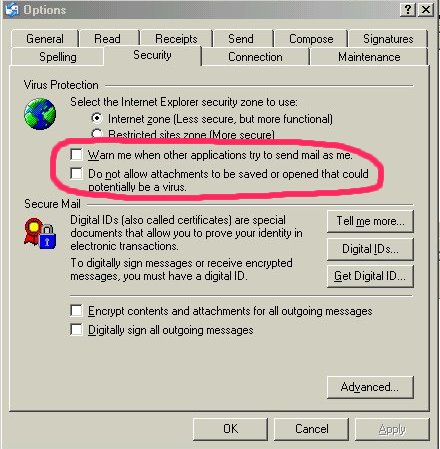
We will not be held responsible for any changes made
by you and strongly recommend using quality Anti-Virus Software instead of the
strict filtering parameters within Outlook Express.
You should also check your firewall settings as many default to not allowing ZIP
files. e.g. Zone Alarm "quarantines" ZIP files. Change this to "allow".
Back to Top
I didn't get my order!
Why hasn't it been sent?
A very good question. If this happens we assure you this is not
intentional. The following reasons are examples of why this has happened in the
past.
we did not receive your order,
you did not wait to be re-directed back to our site following the banking
transaction,
incorrect or incomplete details were provided on the order,
server delays or failures,
your mailbox is full on your server,
your email account has been closed,
your email security settings are too high.
NOTE: Check in your "Junk Mail" folder. Due to overly eager security settings,
newer versions of Hotmail and other free mail systems may store your order in
the Junk mail folder.
ALSO NOTE: Hotmail, Yahoo, MSN, and other Freemail accounts
often use server rotation. This server rotation can cause disruption while
on-line ordering is in process during the financial authentication. This may
cause you to receive your billing information but not the files ordered.
If possible, do NOT use HOTMAIL or FREE MAIL email addresses when ordering.
If you think there is a delivery problem, simply
Email or call and provide all details you have received. We will re-send without
charge. Check your Email
address first. We can't reply to your Email about the order not being supplied
if you send us an invalid Email address.
Hotmail users should check in their "junk mail"
folder. Hotmail tends to place the sender's "first time mail with attachments"
in this folder. All you need do is "check" the box next to our mail send, and
select "not junk mail". Then return to your inbox. Our send will be there.
Failure could also be due to
the abundance of virus mail and spam mail. This mail can be
created with yours, or our, addresses contained within. The
re-propagating of this mail can cause servers to temporarily
filter that particular address. Unfortunately, if that address is
yours or ours, the delivery could fail. We will attempt to re-send
OR send to an alternate address.
Back to Top
When I the "Pay Now" button, nothing happens!
This is possibly due to some type of filtering within your system. You will
need to DISSABLE any filtering that will stop JAVASCRIPT. This may require you
to lower the script settings in your browser or 3rd party security software. For
example, ZONE ALARM has JAVASCRIPT blocking in Privacy>Main>Mobile Code Control.
If you are using Windows XP Service Pack 2, check your IE advanced settings.
Pop-Up and other filtering is ENABLED by default. You may need to disable those
settings.
Back to Top
I am getting an ERROR 605 message when completing my order!
This is due to the use of over intense security
within the banking system. You must use an Email address with 3 or more
characters following the @
e.g.
12@ie.co will FAIL
12@iea.co will PASS
Back to Top
What will the charge look like on my credit card?
Your credit card statement or other records will show a billing from BandTrax.
If someone contacts us regarding a charge, we do not disclose the details unless
we are certain it is the same person who placed the order. The only exception
will be if Bank Officers, Visa, MasterCard, Diners, Amex, JCB, State or Federal Police Fraud
Departments or Taxation officials make an enquiry. We are required to disclose full information to
them.
Back to Top
Will you sell or give my contact information to
another company?
We have been in business for many years and plan to be in business for many more.
Selling or providing customer information to a third party is in direct conflict
with our ideals. All credit card transactions are handled by the National
Australia Bank and are NOT connected to any of our computers or on-line systems.
The National Australia Bank receive only information they require to verify and authorize your credit
card. They are under strict obligation to keep your personal information
private.
Back to Top
Can I have a catalogue mailed to me?
We do mail catalogues, however due to the high cost of overseas postage we
restrict the mailing of catalogues to within Australia only. Complete listings
are available online at our web pages.
Back to Top
When will my order be sent?
All Email orders are sent at the time the E-Commerce system authorises your
transaction,
however we can't foresee possible server delays or other unforeseen problems. Express Post orders are sent
out the same day. All on-line orders are completed and sent 24 hours a day, 7
days a week. All postal orders and phone enquiries are handled personally
during normal
business hours. As we hold all master files, nothing will ever be subject to
availability or back order.
Back to Top
How
much is delivery?
All on-line Email orders are supplied FREE of any delivery costs. Postage and Handling
costs for orders sent Express Post within Australia are Au$7.00 including GST.
Back to Top
Do I have to pay any Taxes?
If you are an Australian Resident residing in Australia, we are required to
collect GST (Goods And Services Tax) and send these collections to the
Australian Tax Office. If you are not a resident of Australia you do not pay any
local or federal Taxes to us.
Back to Top
Can I Phone my
Order?
All orders phoned in are handled immediately during business hours. To Order by Phone simply select the
catalogue numbers you require, have your credit card details ready and call to
speak to a live representative.
| Local |
4059 0411 |
| Interstate |
07 4059 0411 |
| Outside Australia |
61 7 4059 0411 |
Between 9 am - 5 pm Monday - Friday (Australian
Eastern Standard/Summer Time)
Back to Top
Can I Fax my
Order?
All orders faxed thru are handled immediately during business hours. To Order by Fax, simply note down, or cut and paste
the catalogue numbers into the order form, and print out/fax the form to:
| Local |
4059 0422 |
| Interstate |
07 4059 0422 |
| Outside Australia |
61 7 4059 0422 |
Back to Top
Can I Post my
order?
All Mailed in orders are handled as soon as we receive them. You can send a
Money Order, Check (payable to BandTrax Australia, from an Australian Financial
Institution, in Australian Dollars), or your Credit Card Details. Simply note down, or cut and paste the catalogue
numbers into the order form, and print out the form. Our postal address is;
BandTrax Australia
P.O.Box 397
Clifton Beach, 4879
Queensland, Australia
Back to Top
Can I pay
directly into your bank?
Yes. By either on-line banking or from your bank/financial service. We will send
you a Request for BandTrax Australia Direct Debit Facilities form. Simply fill
in the details and return it to us. We will then forward our banking details to you.
Back to Top
What if I received a wrong
MIDIfile?
If you received a file you did not
order, please accept our apologies. O.K., we all make mistakes but if it's our
mistake, you win. Keep it. Use it if you want. All you need to do is immediately
tell us about the incorrect file, the date you received it together with the
accompanying invoice number and we will process a FREE replacement of the
correct file. If you have lost your invoice, please provide the following
information. Your full name, address, email, and the catalogue number you
originally requested. The more information you give us, the more this will help
us, which will result in quicker processing of your replacement.
Back to Top
What
if I get a Defective File?
BandTrax professionally programme MIDI files for use in live entertainment,
therefore all customers are guaranteed a quality product.
Unfortunately, now and then a problem may occur during delivery, either by mail
or Email. If this happens, all you need do is simply advise us of the defective
item, explaining the problem and the invoice number relating to the order. We
will handle the replacement as soon as possible. If you have lost or
can't locate your invoice, please provide the following information. Your full
name, address, email, phone number, and approximate order date. The more
information that you provide, will help us identify your order, resulting in a
quicker process of your replacement.
Please phone us or send this information to:
bandtrax@bandtrax.com.au
or post to;
BandTrax Australia
P.O.Box 397
Clifton Beach, 4879
Queensland, Australia
Back to Top
How do I know my transaction is safe?
The BandTrax.com E-Commerce transaction requirements are secure and handled by the
National Secure Internet Payment Service, a division of the National Australia
Bank. This ensures that all information you send to us via
the World Wide Web will be encrypted and handled away from the BandTrax web
pages. If any other Internet user intercepts the
communication he/she will only be able to see it in an encrypted (garbled) form.
BandTrax DO NOT receive any of your financial details from the National Secure Internet
Payment System. When you make a purchase from us, you provide your name, email
address, credit card information, address, and phone number. This
information is used to process your order. Our servers protect this information using
advanced encryption and firewall technology. Your personal information cannot be
externally read from our ordering or accounting systems. Credit card
transactions are handled by the National Australia Bank on a separate banking
system NOT connected to our internal or on-line systems. They receive the
information needed to verify and authorize your credit card and to process your
order. They are under strict obligation to keep your personal information
secure and private.
Any 3rd parties getting access to your credit card details will not be from our
site. Any unauthorised details acquired will most likely have been from a manual
transaction ......a retail store, restaurant, etc. or direct theft. These
details are then handed over/sold to the crooks. They then use the Internet to
easily check if your card is still valid by attempting to purchase a low priced
item .... like a MIDIfile. Remember, they don't want the MIDIfile, they want to
know if the card works. If it does, they then have a shopping spree for much
larger items. Unfortunately, if we are the first place it is used, the owner
would naturally think that we had something to do with it. The truth would be
that we are only one of hundreds of ways to test if a card is valid.
Back to Top
How do I create an on-going on-line account?
For security reasons we do not keep customer online accounts. We feel that
offering customers the option to create online accounts, may be convenient, but
it also creates the threat of malicious people trying to hack/steal such
information from our web servers.
Back to Top
What is the quality of your
MIDIfiles?
When you purchase MIDIfiles from BandTrax you are getting:
- Top-quality First
Generation files.
- Legally licensed music reproductions.
- Four discreet Formats available to suit all
hardware & software. GS & GM in
either Format 0 or Format 1.
- All files, GS, GM, Format 1 and Format 0 are
supplied from our master files.
- All files are mastered thru discreet mastering
software to enable a standard within all files.
- All files are secured directly from the authorized
programmer/producer.
- Prompt, secure, personalised service.
- Full after sales support.
Back to Top
What
are my payment options?
We accept the following major credit cards. BankCard
(Australian), Visa, MasterCard, Diners, American Express and JCB Card.
For JCB Card holders, enter the details as AMEX. There is no surcharge for using your credit card. Please make sure you provide
your correct card details, billing address and telephone number. Any incorrect
information will cause a delay in processing your order. Within Australia only
you may also use Money Orders, Bank
Checks, Company Checks & Personal Checks in Australian Dollars only from an
Australian financial institution, made
out to BandTrax Australia. Direct Deposit and On-Line banking is also accepted.
Please apply for our details when using Direct Deposit or On-Line Banking.
Back to Top
My
Credit Card is being declined. It should be O.K.?
If your credit card is being declined yet you know there are
funds available, you have three options. Firstly, try again. Make
sure NOT to use any spaces between the card numbers. Secondly, contact your card
provider. We have been advised that many credit cards are now being
"coded" to not allow Internet Transactions from certain
territories. Ask your card provider
to remove the filter. Thirdly, you can go to our web pages at
www.bandtrax.com.au then go to the Order Form page. Select the
second ordering option, The BandTrax Order Form, and place
your order from here. We will process your order and details thru a
non-internet connection. This procedure can not be "instant
download" as we must complete your order manually via a secure stand alone
terminal, however we will be as quick as we can in forwarding your
order.
Back to Top
I need
a copy of my invoice.
Please contact
bandtrax@bandtrax.com.au with your invoice number or name and address and
date of purchase.
Back to Top
Investor
Information
Thank you for your interest in
and continued support of BandTrax Australia. Currently, BandTrax Australia
is a
privately-held company owned by the Company's founders, Musical Instrument
Distributors International (MIDI) Pty Ltd. Therefore, shares are not available for sale to the general public. Federal and
State laws prohibit us from offering our share stock to the general public.
Back to Top
Privacy Policy
Recent changes to Privacy Laws restricts access to your personal details outside
of direct business agreement operations between yourself and the business
operator or representative of that business. We have always operated under
those guidelines so nothing has changed for us and our clients. These new laws
also restrict to who and where your details may be made available. When ordering, we ask for your name, your residential address, the delivery
address, your phone number, your credit card number, expiration date and card holder's name and
your email address. This information is private and kept on isolated secure
systems. This information is only used for processing your order,
to administer accounting and to notify you of new releases or special offers. If
you do not wish to be contacted by us, please advise us.
Back to Top
Copyright and Trademark Notice
All pages and contents of those pages contained in this web site are
exclusively licensed to or are the exclusive property
of BandTrax Australia, except where otherwise acknowledged, and are
protected under Australian and International copyright laws.
Everything on the site, including the design, text, logos, graphics, data,
images, information, facts and configuration, are the property of BandTrax
Australia, Copyright © 1992-2006. You may use the contents of this site
exclusively for the intention of future purchase of goods, or for placing an order,
or for your own reference and for no other objective. All reproduction rights are reserved and
no material from this site may be copied, reproduced, modified, linked to,
republished, uploaded, posted, transmitted, manipulated, stored
or distributed in any manner or method without the written permission of
BandTrax Australia.
All rights not expressly granted are reserved. No material is within the
public domain.
Any unauthorized use of any material
appearing on this site as the basis for another concept
may infringe copyright, trademark and other laws, resulting in criminal or civil
prosecution.
Back to Top
Can I get a complete
catalogue?
You may download a complete catalogue
from here.
Back to Top
I Can't
Get The Demos To Play. Can I save them and listen to them later?
The demos will play by left ing on the DEMO
 icon. By
right ing on the DEMO
icon you can
save the demo file for evaluation later in your favorite MIDI playback device. icon. By
right ing on the DEMO
icon you can
save the demo file for evaluation later in your favorite MIDI playback device.
To enable playback from your PC you must have Windows Media Player or some other
form of media playback software installed correctly. You should find Windows
Media Player on your PC at "C:\Program Files\Windows Media Player\WMPLAYER.EXE".
You can get the current version of Windows Media Player from
www.microsoft.com.
Windows Media Player also needs to be associated to MIDIfiles to enable
playback. If you are not confident in making changes to your system, please do
not attempt the following changes as you may disable other media playback
devices. Get someone who knows what these changes can
do to help you. We will not be responsible for things going wrong. If you are
confident in making system changes, follow the guides below. To check the
association, right a midifile on you PC and select properties. You should
see something similar to;
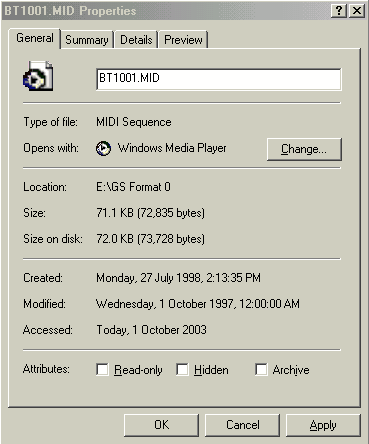
The important parts are the Type of File: and Opens with: They
should be set as in the image above. To change the Opens with: on the Change
button. You will see a list of association options similar to the following
image.
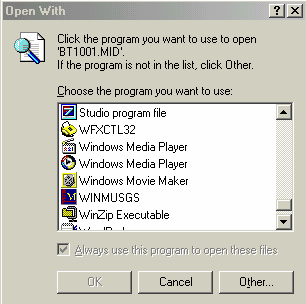
Scroll down and view the Windows Media Player options. If you
have more than one Media Player option, select the second one shown in the image
above.
If the MIDIfile property box does not show Type of File: MIDI
Sequence you will need to establish this connection. This gets a little more
tricky. You need to go to My Computer > Tools > Folder Options > File Types.
You should see something similar to;
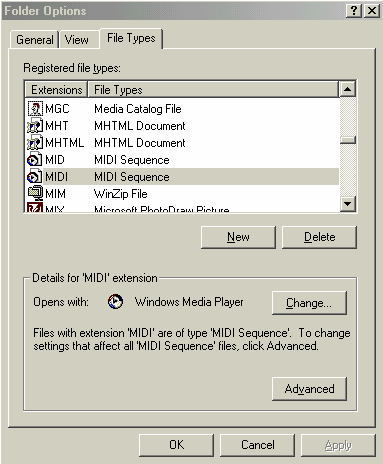
Scroll down and make sure that MID & MIDI are associated to MIDI
Sequence and Opens with: Windows Media Player.
Back to Top
What's a F and Q page?
It's FAQ. Frequently Asked Questions. And you're looking at one right now.
Back to Top
I am trying to record your MIDIfiles onto a CD but it
won't work. What am I doing wrong?
As all computer configurations are different, we can only advise
you of the process and devices required.
Items you must have are:
A MIDIfile playback device. (Media Player, dedicated software like Cakewalk,
Cubase, etc, or an external MIDIfile player.)
An audio recording device. (Software within the PC or external devices like
tape, minidisc, video recorder, etc)
A CD burner.
|
If you are using
a self contained PC system the process is; |
|
| |
Play the MIDIFile.
Record the audio produced by the MIDIfile as a *.wav (wave)
file.
Burn the CD using the *.wav file to an Audio CD. |
|
If you are using
external devices the process is; |
|
| |
Play the MIDIfile
from the PC or external MIDIfile player.
Record the MIDIfile audio produced, to the PC audio or external
tape, minidisc, video, etc.
If recorded to an external device you now record the audio
produced, from the tape, minidisc, video, etc. to the PC using
audio recording software within the PC. Record this audio as
*.wav (wave file).
Burn the CD using the *.wav file to an Audio CD. |
For settings and configurations of your software and hardware
consult the owner's manual or contact the installer/supplier.
If you do not have the above set-up or would like to simplify
the process, you could look at using an "all-in-one" software package. We often
use the Roland/Edirol Virtual Sound Canvas Multi Pack with GM2/GS Multitimbral
Software Synthesizer. This is a complete package containing software
synthesizers that run on Windows and Macs. You can select a Sound Canvas Model
to use and then simply convert all of our MIDIfiles to Audio (wave) and then
burn your CD.
Back to Top
|